









Protect More. Spend Less.

Backup & Archiving for Microsoft 365

SharePoint • OneDrive • Exchange

Eliminate storage overages.
Recover faster.

Watch and Learn More

60%+

savings on storage costs

Microsoft Doesn’t Back Up Your Data. You Do.

Microsoft’s shared responsibility model only guarantees platform uptime — not data recovery. Without the right protection, data loss turns into data chaos.

The result? Higher cost. Missed RPO and RTOs. More risk — while everyone assumes IT “has it handled.”

Explore our resources library and learn more about how to achieve complete data resilience. You’ll find our 2025 Guide to SaaS Backup, learn about the shared responsibility model, and more.

Lower Costs. Faster Recovery. Built-In Compliance.

Archiving Eliminates Storage Overages

For most enterprises, data grows by more than 20% every year. Without the right controls, that growth drives storage overages and unpredictable backup costs. CrashPlan keeps your Microsoft 365 footprint lean and predictable with built-in archiving and data control that contain costs without limiting access.

  • SharePoint, OneDrive and Exchange archiving: automatically archives inactive or old SharePoint, OneDrive and Exchange data while leaving file stubs for quick user access. For many customers, CrashPlan pays for itself, saving them 60%+ on SharePoint storage.
    Calculate your Microsoft 365 Storage Savings
  • Data efficiency: deduplication, compression, and incremental backup retain everything essential, without excess storage.

Outcome: controlled growth, predictable spend, right-sized storage footprint that scales with your business.

Faster, More Complete Recovery

When data loss strikes, speed and completeness of data recovery matter. CrashPlan restores everything fast and without time-consuming mailbox or site rebuilds. You recover everything, exactly as it was, so users get back to work in minutes, not hours.

Cloud-to-cloud restore: cloud-to-cloud restore delivers full recovery 2-5x faster with minimal disruption.

SharePoint, OneDrive, and Exchange Online recovery: Granularly restore individual documents, folders, and emails. Or restore entire assets like SharePoint sites—with full metadata, permissions, and sharing links.

Self-serve recovery: Lets users restore what they need, reducing IT tickets, and recovery delays.

File stubbing: Users access to files even before a full restore completes.

Integration with Microsoft 365 Backup Storage API: Microsoft’s rapid-recovery, full asset restore capability. Learn more.

Outcome: rapid recovery, seamless user experience, and a more resilient Microsoft 365 environment.

The Lowest Cost Storage, Without Vendor Lock-in

Storage drives up to 70% of your backup costs. CrashPlan helps you cut that spend by giving you the freedom to choose low-cost storage options; or use the space you already own. You stay in control of cost, performance, and architecture instead of being locked into a vendor’s pricing model.

  • Unlock free OneDrive storage: patented by CrashPlan, you can pool unused OneDrive storage from your Microsoft 365 subscription, into a secure container for your backup.
  • Other storage options: Use CrashPlan’s low-cost cloud (data centers and Azure), or bring your own storage to maintain full control and flexibility.

Outcome: predictable spend, reduced TCO, and budget freed for more strategic IT initiatives.

Compliance, Legal Hold and eDiscovery Without Complexity

Regulators are watching closely, and “Microsoft has it handled” is no longer a safe answer. Compliance should never come as an afterthought. CrashPlan builds retention, legal hold, and eDiscovery directly into the backup process — so compliance happens automatically, not reactively.

Integrated controls: Legal hold, eDiscovery, and retention rules live within backup workflows, reducing risk and eliminating redundant archives.

Unified oversight: Gain a single, auditable view of data protection, governance, and recovery activity.

Audit readiness: Meet GDPR, HIPAA, and SEC requirements with automated retention enforcement and flexible data residency options.

Outcome: continuous compliance, simpler audits, and less administrative overhead for you and your legal teams.

Archiving Eliminates Storage Overages
Watch the Demo

For most enterprises, data grows by more than 20% every year. Without the right controls, that growth drives storage overages and unpredictable backup costs. CrashPlan keeps your Microsoft 365 footprint lean and predictable with built-in archiving and data control that contain costs without limiting access.

  • SharePoint, OneDrive and Exchange archiving: automatically archives inactive or old SharePoint, OneDrive and Exchange data while leaving file stubs for quick user access. For many customers, CrashPlan pays for itself, saving them 60%+ on SharePoint storage.
    Calculate your Microsoft 365 Storage Savings
  • Data efficiency: deduplication, compression, and incremental backup retain everything essential, without excess storage.

Outcome: controlled growth, predictable spend, right-sized storage footprint that scales with your business.

Faster, More Complete Recovery

When data loss strikes, speed and completeness of data recovery matter. CrashPlan restores everything fast and without time-consuming mailbox or site rebuilds. You recover everything, exactly as it was, so users get back to work in minutes, not hours.

Cloud-to-cloud restore: cloud-to-cloud restore delivers full recovery 2-5x faster with minimal disruption.

SharePoint, OneDrive, and Exchange Online recovery: Granularly restore individual documents, folders, and emails. Or restore entire assets like SharePoint sites—with full metadata, permissions, and sharing links.

Self-serve recovery: Lets users restore what they need, reducing IT tickets, and recovery delays.

File stubbing: Users access to files even before a full restore completes.

Integration with Microsoft 365 Backup Storage API: Microsoft’s rapid-recovery, full asset restore capability. Learn more.

Outcome: rapid recovery, seamless user experience, and a more resilient Microsoft 365 environment.

The Lowest Cost Storage, Without Vendor Lock-in

Storage drives up to 70% of your backup costs. CrashPlan helps you cut that spend by giving you the freedom to choose low-cost storage options; or use the space you already own. You stay in control of cost, performance, and architecture instead of being locked into a vendor’s pricing model.

  • Unlock free OneDrive storage: patented by CrashPlan, you can pool unused OneDrive storage from your Microsoft 365 subscription, into a secure container for your backup.
  • Other storage options: Use CrashPlan’s low-cost cloud (data centers and Azure), or bring your own storage to maintain full control and flexibility.

Outcome: predictable spend, reduced TCO, and budget freed for more strategic IT initiatives.

Compliance, Legal Hold and eDiscovery Without Complexity

Regulators are watching closely, and “Microsoft has it handled” is no longer a safe answer. Compliance should never come as an afterthought. CrashPlan builds retention, legal hold, and eDiscovery directly into the backup process — so compliance happens automatically, not reactively.

Integrated controls: Legal hold, eDiscovery, and retention rules live within backup workflows, reducing risk and eliminating redundant archives.

Unified oversight: Gain a single, auditable view of data protection, governance, and recovery activity.

Audit readiness: Meet GDPR, HIPAA, and SEC requirements with automated retention enforcement and flexible data residency options.

Outcome: continuous compliance, simpler audits, and less administrative overhead for you and your legal teams.

VP, IT Global Infrastructure Operations and Head of IT Security, Coherent Corporation
Dale Bynum

Truly Enterprise-Class

“Being a Microsoft 365 customer, we were looking for an alternative that would help us leverage the petabytes of OneDrive storage we had at our disposal. Apart from allowing the usage of OneDrive as a backup vault, [CrashPlan] also solved several other issues that we were unable to get addressed with our previous solution. It is truly an enterprise-class product.”

Product Review
Expert Insights

Flexible and Granular

“CrashPlan is a great solution for organizations with upwards of 100 users, that require granular control and detailed backup information, to ensure adherence with regulatory or compliance standards. A standout feature of CrashPlan is its ability to either backup data to CrashPlans’ Azure storage or for the customer to utilise their own storage and backup to AWS, Google or an on-premise server. ”

Financial Services
VP, IT Infrastructure

No More Worries

Before we discovered CrashPlan, we needed help with the security of our Exchange data. Microsoft’s limitations left us vulnerable, and we constantly worried about our data safety. With CrashPlan’s robust features, our Exchange data is now safely backed up and protected.

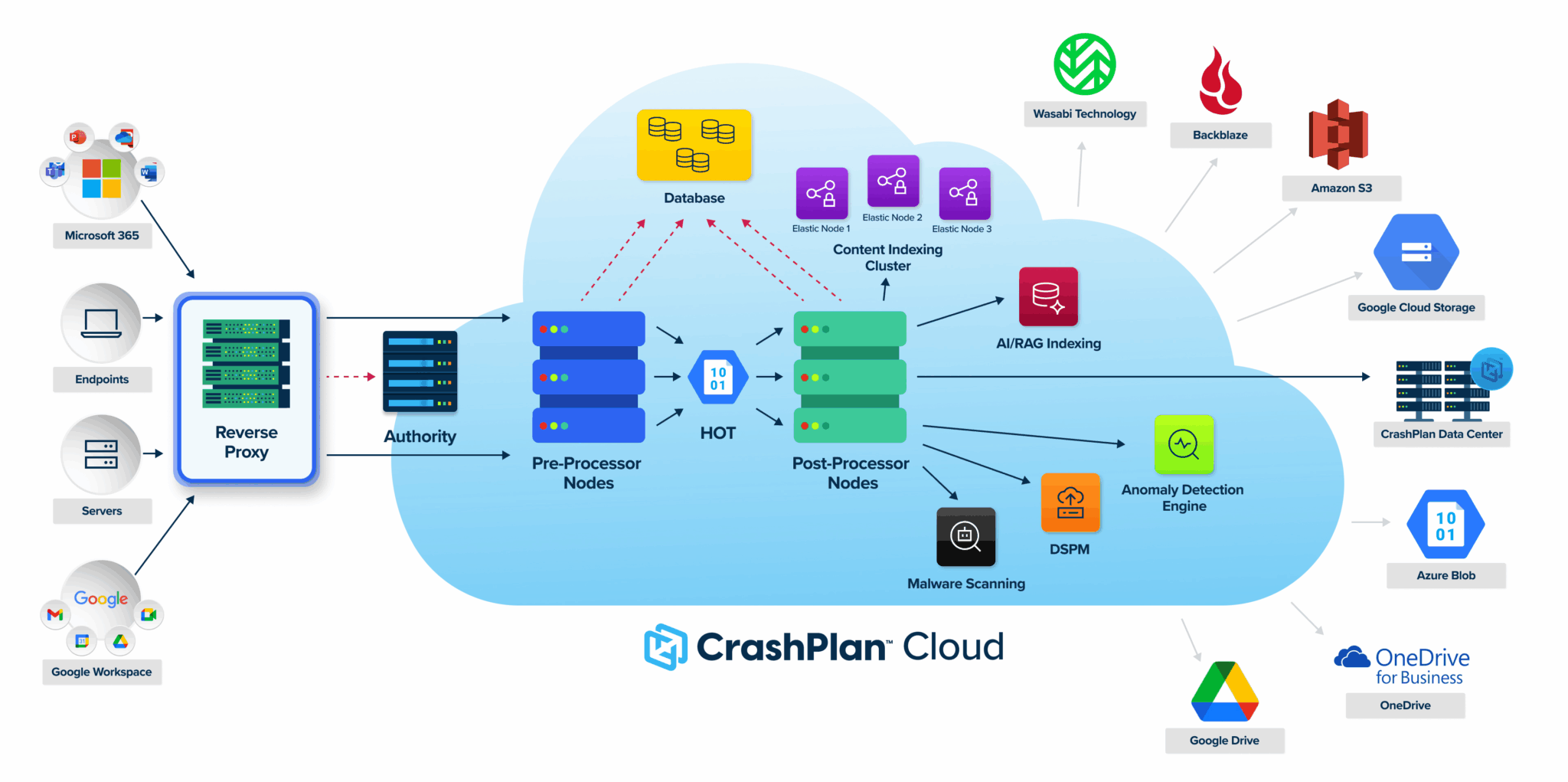
Secure and Scalable Cloud-native Architecture

CrashPlan platform architecture diagram

Built for Enterprise Trust

CrashPlan safeguards Microsoft 365 data with verified security, compliance and privacy controls, designed to meet the standards of the most regulated industries.

SOC 2 Type II & ISO 27001

Independently audited controls for security, availability and confidentiality.

Balancing scale icon

Meet GDPR and HIPAA Compliance

Retention, encryption and privacy controls that satisfy global regulatory frameworks.

AES-256 + Customer-managed Keys

End-to-end encryption for every backup and restore, with optional customer key control.

Global Data Sovereignty

Choose where your data resides to meet regional and industry-specific requirements.

Want to see how CrashPlan meets your compliance requirements?

FAQs

1. Does Microsoft 365 back up my data?

Not in the traditional sense. Microsoft 365 provides data replication and short-term retention to guard against infrastructure failures and accidental deletion. However, it does not offer comprehensive backup and user-friendly restore capabilities with customizable retention. Unprotected Microsoft 365 data is vulnerable to malicious deletion, ransomware, and user error.

2. What is Microsoft 365’s native retention policy, and how does it compare to a true backup?

Microsoft 365’s retention settings are designed for short-term data management, not long-term, comprehensive backup. Microsoft typically retains data for 30 days, after which it moves to a second-stage recycle bin, where it is recoverable only by an administrator for 93 days. This places a burden on both end-users and administrators when deleted data is required after 30 days. A true backup solution will enable you to customize your retention policies according to your organization’s specific legal and operational requirements.

3. Why should I back up my Microsoft 365 data with CrashPlan?

CrashPlan adds a critical layer of protection beyond Microsoft’s native functionality. It provides continuous, independent backups with customizable retention policies, self-service recovery, powerful legal hold and ediscovery features, and an array of data storage locations to fit your regulatory and data residence requirements. CrashPlan saves you storage costs by performing data compression and by incrementally copying only new or updated data. Additionally, CrashPlan provides a zero-cost storage option that securely utilizes the OneDrive space included with your Microsoft 365 subscription.

4. How does CrashPlan back up Exchange Online, SharePoint, and OneDrive?

CrashPlan connects to Microsoft 365 via a secure API and performs automated, encrypted backups of each user’s data. It captures snapshots independently of Microsoft’s retention limits, allowing for flexible protection that meets your organization’s unique Recovery Point Objectives (RPOs) and Recovery Time Objectives (RTOs). CrashPlan also integrates with Microsoft’s large-scale recovery API, Microsoft 365 Backup Storage, for rapid ransomware recovery.

5. Can I perform point-in-time restores?

It’s easy to restore data from a specific point in time using CrashPlan. Customizable backup frequency settings enable you to align with your Recovery Point Objectives. The intuitive self-serve interface enables users to find and restore the exact version they need in the event of accidental deletion, data corruption, or simply to reference previous versions of their work. If ransomware hits, users can restore their data from the point in time just before the attack.

6. Is my Microsoft 365 backup data secure with CrashPlan?

Yes, CrashPlan’s platform is built with zero-trust principles at its core. Data is encrypted end-to-end (both in transit and at rest) utilizing AES-256 and TLS encryption protocols, and remains immutable within the storage destination. Additionally, customizable role-based access controls enable you to manage  precisely who requires what level of access to the backups.

7. Does CrashPlan’s Microsoft 365 backup solution help with compliance regulations like GDPR, HIPAA, and SOC 2?

CrashPlan helps meet regulatory requirements by ensuring secure, encrypted backups with customizable retention policies and audit logs that record backup and restore activity. CrashPlan holds up-to-date certifications in SOC 2, ISO 27001, and a comprehensive array of other security frameworks—and can provide a Business Associate Agreement (BAA) for HIPAA compliance. Learn more about our commitment to security, privacy, and compliance.

8. How is pricing determined for Microsoft 365 backup?

CrashPlan’s Microsoft 365 backup solution is priced per user. Each user can back up their Exchange Online, OneDrive, SharePoint data under one license. CrashPlan offers bulk licensing discounts. Contact our sales team to get a customized quote.

Time to back it up.

Data resilience starts with a solid backup plan.