If you have read Gartner Optimize Storage in Microsoft 365, you already know the headline. Microsoft 365 storage is not unlimited, and pooled SharePoint and OneDrive tenant storage can become increasingly complex to manage as collaboration and AI-assisted content creation accelerate data growth. You likely have better visibility than ever into where storage is being consumed. What is harder is turning that insight into meaningful cost control.
But what comes next? This article shows how you can act on Gartner recommendations by extending governance and reporting with an archiving strategy that helps reduce Microsoft 365 storage costs.
Storage Insight Is No Longer the Hard Part
Gartner outlines a clear approach to optimizing Microsoft 365 storage: audit usage, analyze growth drivers, and optimize consumption. For many organizations, the first two steps are already in place. You can see which workloads consume the most storage, how fast data is growing, and where pooled storage limits are being approached or exceeded.
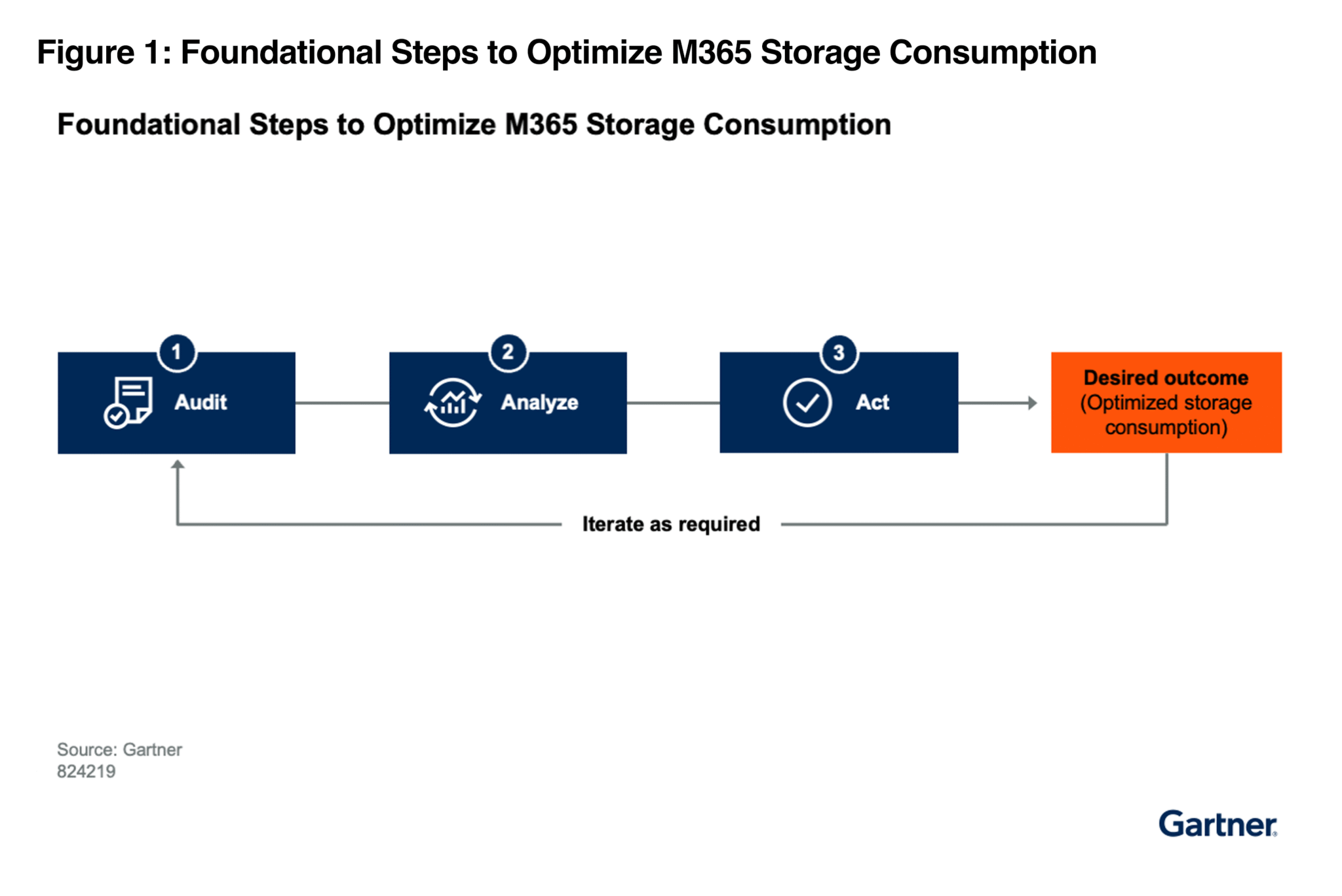
The problem is that visibility alone does not change outcomes.
As SharePoint, OneDrive, and Teams (which store files in SharePoint and OneDrive) continue to consume from the same pooled tenant storage allocation, growth compounds over time. Increased content creation and versioning, often accelerated by AI-assisted workflows, can further expand storage usage. Even with strong governance controls, storage costs continue to rise unless you have a way to move inactive data out of primary Microsoft 365 tenant storage.
Why Governance Alone Cannot Reverse Storage Growth
Governance and lifecycle policies matter, but they primarily influence how new data is created and managed. They do little to reduce the volume of historical data that already exists in your environment.
That leaves you choosing between two options. You can delete data, which may introduce legal, regulatory, and business risk. Or you can continue purchasing additional Microsoft storage and accept ongoing overage charges.
Microsoft provides native options for retention and site-level archiving (such as Microsoft 365 Archive for SharePoint), but these approaches may introduce constraints such as limited granularity or reactivation considerations when the goal is fine-grained cost control.
To control costs sustainably, organizations need a way to reduce Microsoft 365 tenant storage consumption without deleting data or disrupting user workflows.
Turning Analysis Into Action With CrashPlan
CrashPlan enables you to act on your storage analysis without changing how users work.
With CrashPlan, you can automatically archive inactive data from your Microsoft 365 tenant storage using clear, admin-defined policies. You decide what qualifies as inactive and when data should be archived. For users, workflows remain consistent. Archived files remain visible within familiar Microsoft 365 experiences, using file stubs that preserve file presence and metadata.
When a user opens an archived file, it is automatically and transparently restored to Microsoft 365. There is no need for users to submit restore requests or manage separate archive systems.
Using CrashPlan, you can:
- Archive infrequently accessed data from SharePoint, OneDrive, and Exchange Online
- Reduce exposure to pooled SharePoint and OneDrive storage overage charges
- Maintain retention policies and support compliance and eDiscovery requirements through preserved data and metadata
- Keep the user experience intact while moving cold data out of primary tenant storage
We feel this approach aligns directly with Gartner guidance to keep operational content in Microsoft 365 while moving older, rarely accessed data to more cost-effective storage, without introducing friction for end users.
More Than Archiving: Built-In Data Resilience
CrashPlan is not just an archiving solution. It also provides comprehensive backup and recovery for Microsoft 365.
As you archive cold data to control storage costs, you also gain:
- Protection against ransomware, accidental deletion, and administrative error
- Granular recovery for Exchange Online, OneDrive, and SharePoint data
- Long-term data protection that supports regulatory and business retention requirements
Instead of choosing between archiving and backup, you can address both cost optimization and data resilience in a single strategy.
Where Storage Costs Escalate Without Archiving
In many Microsoft 365 environments, storage overages are driven by predictable patterns. SharePoint sites grow year after year with limited cleanup. Large files with extensive version histories consume more space than expected. When individual OneDrive quotas are increased beyond their default allocation (commonly 1 TB per licensed user in enterprise plans), the additional capacity consumes pooled tenant storage. New workloads generate durable content by default.
Once your organization exceeds its tenant storage allocation, additional storage is billed at a per-gigabyte rate. Without an archiving strategy, these costs can increase year over year even if user counts remain stable.
By archiving cold data with CrashPlan, you reduce a significant portion of excess consumption within Microsoft 365 tenant storage. This can lower immediate overage costs while slowing future growth.
A Practical Path to Sustainable Storage Control
In the report, Gartner points out that not all data belongs in Microsoft 365 indefinitely. Frequently accessed, collaborative content should remain in tenant storage. Data that must be retained but is rarely accessed can be moved to lower-cost archival storage.
CrashPlan allows IT to make that distinction deliberately and safely. Policies are centrally managed by IT, not end users. Data is not deleted; it remains protected and recoverable when needed.
As Microsoft 365 continues to expand, this approach provides a practical way to keep storage costs predictable while maintaining resilience.
Quantify What This Could Mean for You
If you are already auditing and analyzing Microsoft 365 storage, the next step is to understand the financial impact of taking action.
Use the CrashPlan Microsoft 365 Storage Savings Calculator to estimate:
- How much excess storage cost you could potentially avoid
- Your potential return on investment from archiving inactive data
- How savings may scale as your data footprint grows over time
Gartner provides the insight. CrashPlan helps you translate that insight into operational and financial outcomes.
Read Gartner Optimize Storage in Microsoft 365 here.
Gartner, Optimize Storage in Microsoft 365, By Jed Cawthorne, Marko Sillanpaa, Rachel O’Farrell, Tim Nelms, Olga Martí , 23 July 2025
GARTNER is a trademark of Gartner, Inc. and/or its affiliates.
About the Author